

The short answer
Report the missing laptop promptly
A lost business laptop response should start as soon as the device cannot be accounted for. The staff member should report the loss to the nominated manager or IT contact, give the last known time and place, and stay available for questions. IT can then identify the correct device, protect access and preserve a useful incident record.
Report the loss while safe checks continue. A laptop under a meeting-room chair and a laptop stolen from a parked car present different risks, but both need prompt reporting. The first report can be updated as facts improve.
Contain available access, work out what information and access may be exposed, and decide the next action using verified device and account records. The OAIC recommends a response plan that covers containment, assessment, management, clear roles and documentation. [2]
Staff action
Give IT details that change the decision
Tell IT who had the laptop, its asset number if known, the last confirmed time and location, and whether it may have been left, lost or stolen. Include the laptop bag, removable drives, security keys, written passwords or access cards that disappeared with it. Report any unusual sign-in prompt, suspicious message or account alert noticed before or after the loss.
Say whether the device was powered off, asleep or signed in when last seen. IT should verify encryption, remote management and backup status in the relevant consoles.
Use a safe phone or another trusted device for communication. Do not sign in through a public computer to change business passwords. Do not ask a colleague to share their password so work can continue. If the missing laptop carried a multi-factor authentication token, smart card or stored browser session, call that out explicitly.
If theft is suspected, follow the organisation's process for police reporting and preserve the report or event number. Staff should not confront a suspected thief or travel to a live map location. Recovery decisions belong with authorised personnel and, where appropriate, police.
First-hour flow
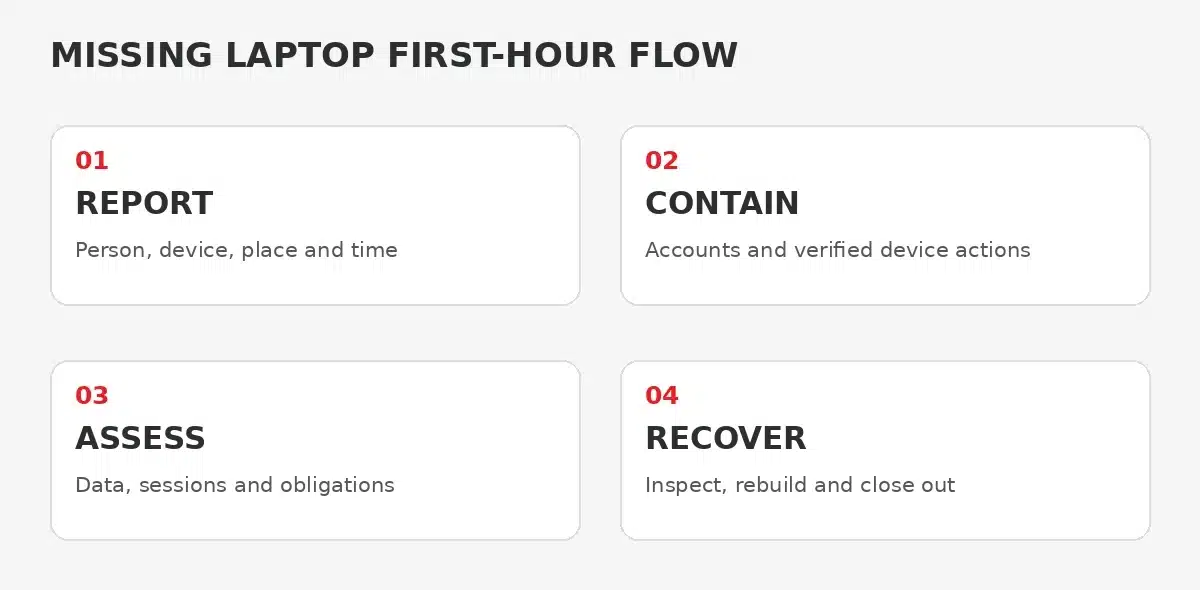
Separate reporting, containment, assessment and recovery
A simple four-stage flow helps the team avoid two common errors. One is doing nothing while searching continues. The other is issuing an irreversible wipe before the device, data and recovery needs are understood. The stages can overlap, but each needs an owner and a recorded outcome.
Report
Record the person, device, last known place and time, missing accessories, current contact details and whether theft is suspected.
Contain
Protect relevant accounts and use verified management actions that the device and platform actually support. Record each action and result.
Assess
Check encryption, management state, local data, browser sessions, removable media, client information and legal or contractual escalation needs.
Recover
Plan safe return, replacement, access restoration and evidence checks. Treat a returned device as potentially compromised until IT clears it.
IT containment
Use the controls that are really available
IT should first match the report to the asset register and management records. Confirm the serial or asset identifier, assigned user, operating system, management platform, encryption state, last check-in and recent compliance information.
Remote actions differ by platform, enrolment and connection state. Microsoft documents separate Intune actions for locating, locking, retiring and wiping devices, with availability and prerequisites varying by platform. For example, Intune Lost Mode supports supervised iOS and iPadOS and ChromeOS rather than every Windows laptop. [3] [4]
An offline device may not receive a queued action until it reconnects, and some actions are not available for a given device. Record what was requested, when it was requested, the console result and what remains pending.
Protect the accounts that matter to the facts. This may include ending relevant sessions, resetting credentials, revoking tokens or disabling a device record, depending on the identity platform and evidence. Avoid a blanket change that disrupts unrelated users. If insurance, legal or forensic requirements apply, coordinate before destroying evidence. Incident response work is separately scoped and may be controlled by the cyber insurer for insured clients.
Privacy assessment
Work out what the laptop could expose
A missing laptop is not automatically a notifiable data breach, and encryption is not an automatic all-clear. The business needs to establish what personal, confidential or regulated information was stored locally or accessible through signed-in services, and whether unauthorised access or loss is likely.
Check local download folders, synchronised libraries, cached email, browser profiles, password managers, remote-access tools, client applications and removable media. Look at the sensitivity and volume of information rather than relying only on a file count. Also check whether valid sessions or saved credentials could provide a route into cloud services after the device is gone.
The OAIC says a response plan should cover containment, assessment and management, immediate reporting lines, escalation criteria, external contacts and documentation. It also recommends recording suspected incidents, including those not escalated to a response team. [2]
Assign the privacy or risk decision to the person named in the organisation's plan. IT can provide device, identity and log evidence, but should not make an unauthorised legal conclusion. If the Notifiable Data Breaches scheme or another contractual duty may apply, obtain the appropriate privacy or legal advice promptly.
If it turns up
Do not put a returned laptop straight back into service
A device found in a taxi office or meeting room may be intact, but the business should still reconcile what happened. Confirm who found it, where it was, how long it was out of control and whether the casing, ports, startup behaviour or account activity looks unusual.
The ACSC advises organisations to report loss or suspected compromise of mobile devices and to treat a lost or stolen device that is later found or returned as potentially compromised in higher-risk travel scenarios. [1] The practical business lesson is to let IT inspect and clear the device before normal work resumes.
Check whether any remote action was queued. A wipe, retire or lock command may still apply when the device reconnects. Do not let the user race that command by switching on the laptop and signing in. IT should decide whether to preserve, inspect, rebuild or replace it, then document the result.
Restore the employee's access through approved channels and verify the replacement or rebuilt device against the normal security baseline. Confirm that essential work files are available from the business's managed storage or backup arrangements.
Close the loop
Record the evidence and fix the weak point
Closeout should identify the device, timeline, people contacted, containment actions, privacy assessment owner, police or insurer references where applicable, and the final device outcome. A complete lost business laptop response also records pending actions separately so that issuing a replacement laptop does not make the incident disappear from view.
Review whether the asset register, encryption reporting, device management, backup, staff reporting route and spare-device process worked as intended. The OAIC recommends reviewing how an incident occurred and the effectiveness of the response so weaknesses can be addressed. [2]
Keep the improvement proportional. A laptop left in a secure internal room may expose a broken sign-out habit. A device missing with a security key may expose an equipment-handling gap. Assign someone to address the identified gap.
Milnsbridge managed IT services can help maintain device records, management controls, account administration and a clear IT support route. [5]
FAQ
Common questions after a business laptop goes missing
Should the employee keep searching before telling IT
No. Report the missing laptop promptly and continue safe checks in parallel. The first report can be updated when the location or circumstances become clearer.
Can IT always remotely lock a missing laptop
No. Available actions depend on the operating system, enrolment, management platform and connection state. IT should verify the exact device and record what the console actually supports and returns.
Does encryption mean there is no privacy risk
Not by itself. Encryption is important evidence, but the assessment should also consider whether the device was signed in, what sessions or credentials were available, what data was stored locally and whether other access paths existed.
Can a recovered laptop go straight back to the employee
Not without an IT check. Reconcile any queued remote actions, inspect the device and account activity, and decide whether it should be cleared, rebuilt or replaced before normal use.
Sources
Current guidance and service scope
Sources checked 27 October 2026.
Explore More
Related support and practical guidance
Managed IT services
IT support, device administration and accountable service ownership.
Endpoint protection
Understand managed protection for business devices.
Incident response
Review the separately scoped response service and insurance coordination.
Endpoint security guide
Read practical guidance on EDR and device management.
Next step
Make the reporting path clear before a device disappears
Milnsbridge provides managed IT support for device administration, account access and everyday incident coordination. Talk to us about the controls and response path that fit your environment.


