The short answer
Test the update with a small representative group first
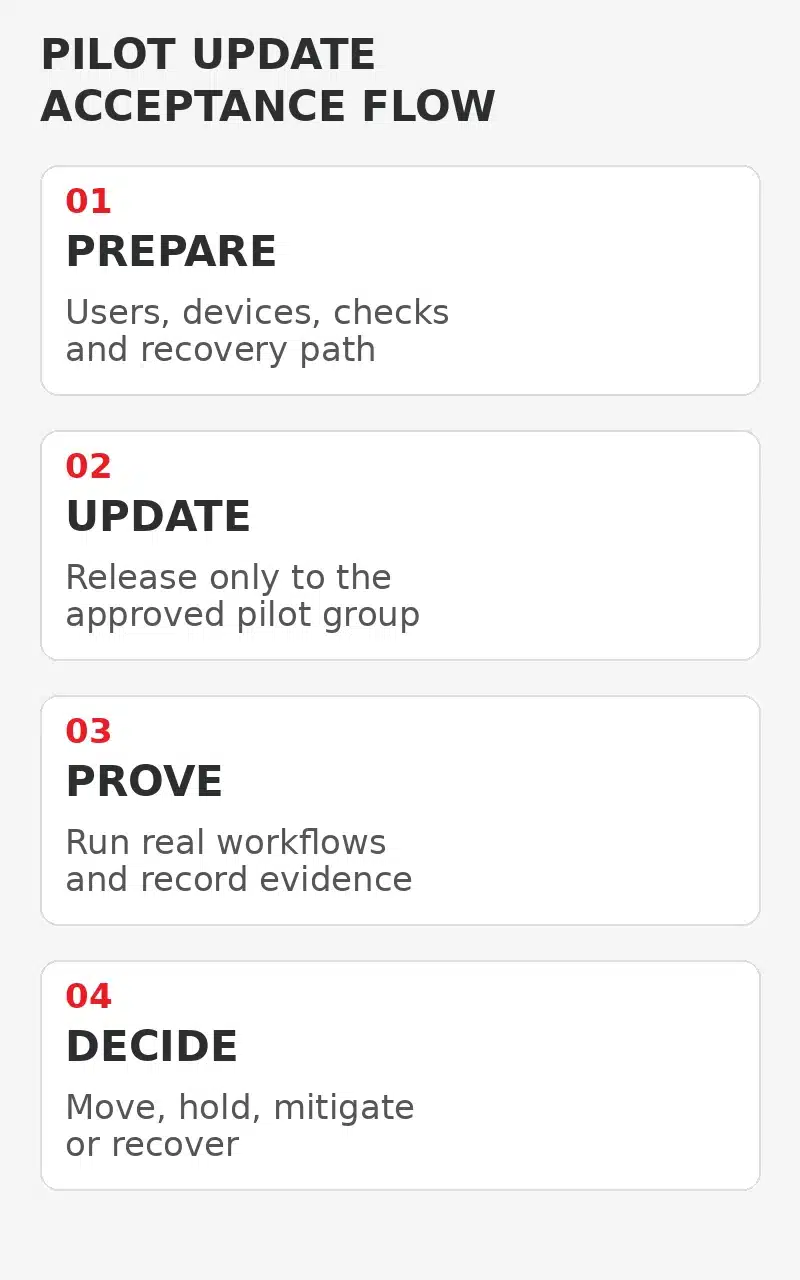
Business application update testing should answer a practical question before a change reaches everyone. Can staff still complete the work that matters after the update? Choose a small pilot group that represents different roles, devices and important workflows. Give them a short acceptance checklist, a clear reporting path and a known way back if the update creates a serious problem.
A pilot is not a delay for its own sake. It is a controlled release stage that can expose compatibility problems while the affected group is still small. Microsoft describes staged deployment rings as a way to offer apps or policies gradually across defined groups, reducing risk through controlled stages. [2]
Keep the pilot proportionate to the update. A routine low-risk change may need a short test across a few representative users. A major version change to finance, practice management, estimating or document software may need vendor checks, data protection steps and a longer observation window. Security urgency can also shorten the available test period, so risk and timing must be decided together.
Choose the pilot
Represent real work instead of choosing only technical users
Start with the business processes that depend on the application. List who creates records, who approves them, who exports or prints them, who uses integrations and who works from different device types or locations. The pilot should cover those differences without becoming a second full rollout.
Include at least one confident user who can describe a fault clearly, but do not fill the group only with IT staff or enthusiastic early adopters. They may work around a problem that would stop another employee. A useful group might include an everyday user, a process owner, a remote worker and someone who relies on a connected scanner, add-in, template or reporting function.
Avoid putting every person from one critical function into the first wave. If the update fails, the business still needs enough unaffected staff to keep the process moving. Record the selected users and devices, why they represent the wider team and who can approve movement to the next stage.
Check leave, deadlines and month-end work before setting the window. A technically convenient time may still be a poor business time if the pilot users are preparing payroll, submitting a tender or closing customer accounts.
Acceptance worksheet
Turn each important workflow into an observable check
Write the checks before the update starts. Each check should name the user action, the expected result and the evidence to record. For example, open an existing record, create a harmless test record, save it, reopen it, generate a report, print to an approved test destination and confirm that a required integration still exchanges data.
Use non-sensitive test data where possible. Do not expose customer information merely to make the exercise feel realistic. If a production record must be viewed, keep the action read-only unless the process owner has approved a controlled test and a way to remove the test transaction.
Record a pass, fail or not tested result for every item. Add the device, application version, time and a short description of any symptom. A single overall tick can hide a broken export, missing template or add-in failure that appears only in one role.
Before deployment
Confirm the recovery path before anyone needs it
Read the vendor release notes and support advice. Check supported operating systems, prerequisites, database changes, add-in compatibility, licence requirements and whether the previous version can be restored. A rollback may mean uninstalling an update, restoring an application package, reversing a configuration or recovering data. Those are different actions and should not be treated as interchangeable.
Confirm who owns the business data and how it is protected. A device restore does not necessarily reverse a server-side database change or a cloud application update. If the vendor controls the platform, clarify what can actually be reversed and what support information they will need. Do not promise a rollback until that path has been verified for the specific application and update.
The Australian Cyber Security Centre recommends clear patch-management processes that account for faults. Its guidance notes that some organisations test patches in a staging environment while others use a rollback mechanism, and that security urgency must be weighed against disruption risk. [1]
Set stop conditions that a pilot user can recognise. Examples include the application failing to start, inability to save or retrieve records, a material calculation difference, broken authentication, a required integration stopping or data appearing incomplete. Name the person who can pause the rollout and the person who can authorise recovery.
Run the pilot
Observe long enough to cover the normal work cycle
Tell pilot users what changed, what they must check and how to report a problem. Ask them not to repair settings, reinstall components or copy files between versions unless directed. Well-intentioned workarounds can hide the original fault and make evidence harder to interpret.
Start with basic access, then run the agreed business workflows. Watch for slow starts, prompts that did not appear before, changed defaults, missing templates, print differences, failed add-ins and integrations that appear healthy but stop exchanging data. Where an application has scheduled jobs or overnight processing, the observation window must include those events before the pilot is declared complete.
Separate application faults from unrelated service problems. Record the time, affected device, version and exact action. Capture screenshots only when they contain no sensitive information. If an error includes customer or employee data, store it through the approved support path rather than a general chat channel.
NIST frames patch management as identifying, prioritising, acquiring, installing and verifying patches, updates and upgrades. Verification matters because deployment success is not the same as the business application working correctly for its users. [3]
Release decision
Use evidence to move, hold or recover
At the end of the pilot, reconcile every acceptance check and support ticket. A release decision should show what passed, what failed, which users and devices were covered and which workflows were not tested. Do not call the pilot successful because most users reported no problem if a critical approval or export step remains untested.
Move to the next group only when the business owner and IT lead accept the residual risk. A minor cosmetic difference may be documented for later correction. A calculation error, data-integrity concern or failure in a critical workflow should hold the rollout. A security update with active exploitation may require a vendor mitigation or other controlled response rather than an open-ended delay. [1]
If recovery is required, use the verified method and repeat the priority workflow checks afterwards. Confirm that application data, integrations, scheduled jobs and user access are in the expected state. Record any manual repair and decide whether the next attempt needs a different package, configuration, group or vendor action.
When the next ring begins, keep monitoring. A pilot reduces uncertainty but cannot represent every device and workflow. Pause points between groups make it easier to contain a newly discovered problem.
Keep the record
Make the next update easier to assess
Keep a compact update record with the application and support documentation. Include the version, release date, pilot membership, devices, acceptance results, incidents, decision owner, wider deployment stages and final outcome. The record should be useful to the next person planning an update, not a folder of unexplained screenshots.
Review the pilot group when staff, devices, integrations or business processes change. A user who represented finance last year may no longer use the same workflow. A newly introduced browser extension, printer, identity provider or reporting connector can change what needs to be tested.
Milnsbridge provides managed IT support that includes patching and broader technology planning for supported environments. Third-party application ownership, vendor support, update timing and recovery responsibilities should be confirmed in the agreed scope rather than assumed. [4]
A repeatable pilot process gives business owners a better release decision. It does not remove every risk, but it makes the important checks, evidence and recovery responsibilities visible before the change reaches the whole team.
FAQ
Common questions about application update pilots
How many people should be in an application update pilot group
Use the smallest group that still represents the important roles, devices and workflows. A simple application may need only a few users, while a business-critical system may need broader process coverage.
How long should the pilot run
Run it long enough to cover the normal work cycle, including scheduled jobs, reporting or integrations that do not occur immediately. Security urgency may require a shorter staged decision.
Can we rely on the vendor saying the update is tested
Vendor testing is useful, but it cannot reproduce every local device, add-in, template, integration and workflow. Confirm the functions your business actually uses.
What if the update fixes an actively exploited vulnerability
Escalate the risk decision quickly. Use vendor and Australian Cyber Security Centre guidance, shorten testing where appropriate and consider approved mitigations if immediate deployment is not safe.
Sources
Technical guidance and current service scope
Sources checked 3 November 2026.
Explore More
Related IT support and update guidance
Managed IT services
Bring application support, patching and technology planning into one accountable IT support scope.
Microsoft 365
Coordinate Microsoft 365 administration and supported cloud workflows.
Essential Eight
Review current guidance for patching and other cyber security controls.
Windows upgrade checklist
See a separate operating-system lifecycle checklist without treating it as application testing.
Next step
Plan the update around the work your team must keep doing
Milnsbridge can help Sydney businesses coordinate supported application updates, pilot testing and wider deployment within an agreed managed IT scope.